
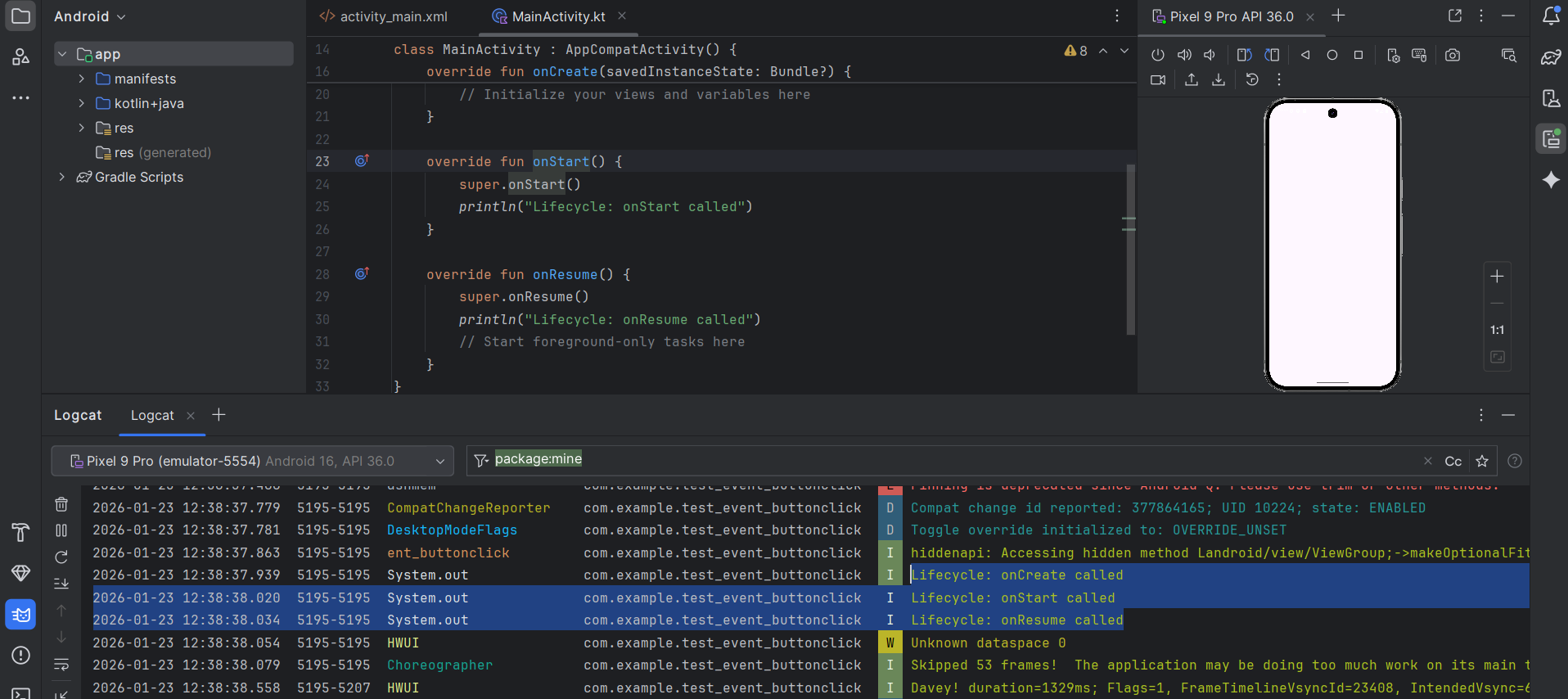
The Activity Lifecycle is one of the most fundamental concepts in Android development. It is the set of states an Activity flows through from the moment it is launched until it is destroyed.
Understanding the first three methods—onCreate(), onStart(), and onResume()—is essential because they handle how your app “wakes up” and prepares to interact with the user.
1. onCreate() – The Initialization
This is the first method called when the activity is first created. It only happens once in the activity’s “lifetime” (unless the activity is destroyed and recreated, like during a screen rotation).
- Purpose: To perform basic application startup logic that should happen only once.
- Common Tasks: * Calling
setContentView(R.layout.activity_main)to inflate your XML layout.- Initializing UI components (Buttons, TextViews).
- Binding data to lists.
- User Experience: The user cannot see or interact with the app yet.
2. onStart() – The Visibility Phase
Once onCreate() finishes, the activity enters the “Started” state, and onStart() is called.
- Purpose: To make the activity visible to the user.
- Common Tasks: This is a good place to initialize code that maintains the UI, though it’s less commonly used for heavy logic compared to the other two.
- User Experience: The app is now visible on the screen, but the user cannot interact with it yet (it’s not “in focus”).
3. onResume() – The Interaction Phase
The activity stays in the “Started” state very briefly before moving to the “Resumed” state, where onResume() is called.
- Purpose: To bring the activity to the foreground. This is the state where the user is actually interacting with your app.
- Common Tasks: * Starting animations.
- Opening the camera or starting a GPS location update.
- Resuming any functionality that was paused when the app went into the background.
- User Experience: The app is fully interactive and has “user focus.”
Implementation in Kotlin
Here is how these methods look in your MainActivity.kt file:
Kotlin
class MainActivity : AppCompatActivity() {

    override fun onCreate(savedInstanceState: Bundle?) {
        super.onCreate(savedInstanceState)
        setContentView(R.layout.activity_main)
        println("Lifecycle: onCreate called")
        // Initialize your views and variables here
    }

    override fun onStart() {
        super.onStart()
        println("Lifecycle: onStart called")
    }

    override fun onResume() {
        super.onResume()
        println("Lifecycle: onResume called")
        // Start foreground-only tasks here
    }
}
Key Takeaway
Think of it like a theater performance:
onCreate(): Setting the stage, building the sets, and hiring the actors (done once).onStart(): Opening the curtains. The audience can see the stage, but the actors haven’t started speaking yet.onResume(): The actors start the play. The interaction begins!
When you move away from an activity—whether you’re opening a new app, going back to the home screen, or receiving a phone call—Android triggers the “teardown” phase of the lifecycle.
Understanding these methods is crucial for saving user progress and saving battery life by stopping unnecessary background processes.
Getty Images
1. onPause() – The Partial Obscurity
This is the very first indication that the user is leaving the activity. The activity is usually still partially visible (for example, behind a transparent dialog or in multi-window mode), but it no longer has user focus.
- Purpose: To pause ongoing actions that shouldn’t continue while the user isn’t interacting with the app.
- Common Tasks: * Stopping animations or video playback.
- Releasing exclusive-access resources (like the camera).
- Saving very small amounts of unsaved data (though heavy saving should wait).
- Constraint: This method must be fast. Don’t do heavy database writes here, or you’ll delay the next app from opening.
2. onStop() – The Hidden Phase
This is called when the activity is no longer visible to the user. This happens when the user switches to another app or a new activity covers the entire screen.
- Purpose: To shut down heavy operations that don’t need to run while the user can’t see the screen.
- Common Tasks: * Stopping heavy sensor listeners (like GPS).
- Saving data to a database.
- Note: The system may kill your app’s process after
onStop()if it needs memory, so this is your last chance to ensure data is saved.
3. onDestroy() – The Final Cleanup
This is the final call received before the activity is destroyed. This can happen because the user finished the activity (hit the “Back” button) or because the system is temporarily destroying it for a configuration change (like rotating the screen).
- Purpose: To perform final cleanup.
- Common Tasks: * Releasing any remaining resources that could cause memory leaks.
- Unbinding services.
Summary Comparison Table
| Method | Activity State | Visible? | Interactive? | Best use case |
onPause() | Paused | Partially | No | Pause video/animations. |
onStop() | Stopped | No | No | Save data to database; stop GPS. |
onDestroy() | Destroyed | No | No | Final resource cleanup. |